Multipurpose theme documentation
Multipurpose Fashion Theme
Header Search Bar
Multipurpose Fashion Theme
Theme: Multipurpose Fashion Theme
Help Center > Header > Search Bar
Overview
The search bar lets shoppers find products, collections, and pages quickly. Most themes include a search bar in the header by default. This guide covers how to add, enable, position, and style the search bar. It is written for merchants, prospective merchants, and theme reviewers.
Where the Search Bar Appears
The search bar is typically part of the Header section. It may appear as:
- A Search block in the Header section
- A built-in element in the header layout
- An icon that expands to a search field when clicked

Search Behavior
What search results include
- Products - By default, Shopify search returns products.
- Collections - If the theme or search app supports it.
- Pages - Store pages, blog posts (theme/app dependent).
- Articles - Blog articles (theme/app dependent).
Instant search and filters
- Many themes support predictive search (suggestions as the user types).
- Check Theme settings > Search for predictive search and result display options.
Styling the Search Bar
Position and layout
- Block order: Reorder blocks in the Header section to move the search bar left, center, or right.
- Icon vs. full bar: Some themes offer a compact icon that expands on click; others show a full bar.
Search Results Display
Desktop
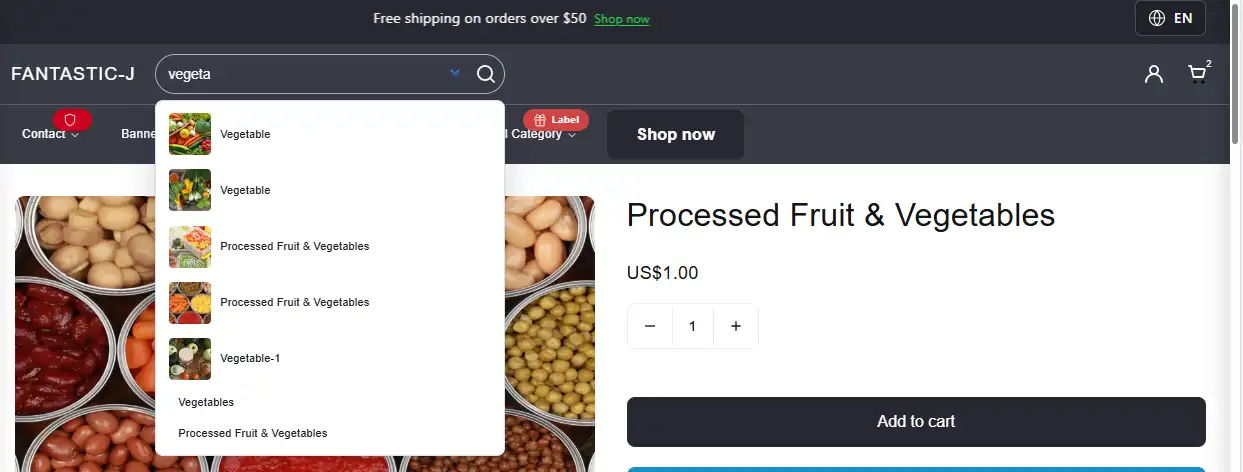
- Results often appear in a dropdown below the search bar as the user types.
- May show product image, title, price, and "View all" link.
- Ensure results are readable and meet contrast requirements.
Mobile
- Search may open in a full-screen overlay or within the menu drawer.
- Touch targets should be large enough (minimum ~44px).
- Test search on real devices for usability.
Advanced Search with Apps
For more powerful search (filters, synonyms, analytics), consider apps such as:
| App | Features |
|---|---|
| Searchanise | Instant search, filters, synonyms |
| Fast Simon | AI search, recommendations |
| Boost Product Filter & Search | Filters, facets |
| Shopify Search & Discovery | Native; customizable in Shopify Admin |
Apps may add their own search bar or integrate with the theme's search block.
For merchants
- Keep the search bar visible and easy to find; it's critical for product discovery.
- Match search bar styling to your brand (colors, border, icon).
- Use predictive search if available to improve speed and relevance.
Common mistakes
| Mistake | Fix |
|---|---|
| Search bar not visible | Add Search block in Header section; check block order |
| Search results empty | Verify products exist and are published; check search app |
| Styling conflicts | Use theme settings or block options; avoid conflicting custom CSS |
| Mobile search hard to find | Ensure search is in header or mobile menu; test on devices |